
Your controllers don’t need to be a second home for if (...) return BadRequest(...).
I’ve reviewed too many APIs where the controller reads like a tax form: 40 lines of “validate this”, “validate that”, and only at the end… the actual business action. It works, sure. But it’s hard to test, hard to reuse, and it grows like weeds.
In this post, you’ll move validation out of controllers using FluentValidation (and keep controllers boring-in a good way). We’ll cover:
- Complex rules (cross-field, conditional, collections)
- Custom validators (reusable rules)
- Dependency injection inside validators (DB checks, feature flags, external services)
Along the way, I’ll show patterns I use in real projects, including the mistakes I made so you don’t have to.
Baseline: what we’re fixing
Here’s the usual “controller validation soup”:
[HttpPost("orders")]
public async Task<IActionResult> Create(CreateOrderRequest request, CancellationToken ct)
{
    if (string.IsNullOrWhiteSpace(request.CustomerId))
        return BadRequest("CustomerId is required");

    if (request.Items is null || request.Items.Count == 0)
        return BadRequest("At least one item is required");

    if (request.Items.Any(i => i.Quantity <= 0))
        return BadRequest("Quantity must be > 0");

    if (request.Currency != "USD" && request.Currency != "EUR")
        return BadRequest("Unsupported currency");

    // ...more validation

    var result = await _orders.CreateAsync(request, ct);
    return Ok(result);
}
Problems:
- You can’t easily reuse these rules (other endpoints, background jobs, message handlers).
- It’s annoying to unit-test controller validation.
- Rules get duplicated and drift (“this endpoint checks X but that endpoint forgot”).
Now let’s clean it up.
One-time setup: FluentValidation in ASP.NET Core
Install packages:
FluentValidationFluentValidation.AspNetCore
Register validators:
using FluentValidation;

var builder = WebApplication.CreateBuilder(args);

builder.Services.AddControllers();

builder.Services.AddValidatorsFromAssemblyContaining<CreateOrderRequestValidator>();

// For FluentValidation.AspNetCore (auto validation):
builder.Services.AddFluentValidationAutoValidation(options =>
{
    // Common defaults are fine; keep this minimal.
});

var app = builder.Build();
app.MapControllers();
app.Run();
What you get:
- When the model binder creates your request DTO, FluentValidation runs.
- If validation fails, ASP.NET Core returns 400 with errors, and your controller action won’t run.
That’s already a big win: controller stays focused on the use case.
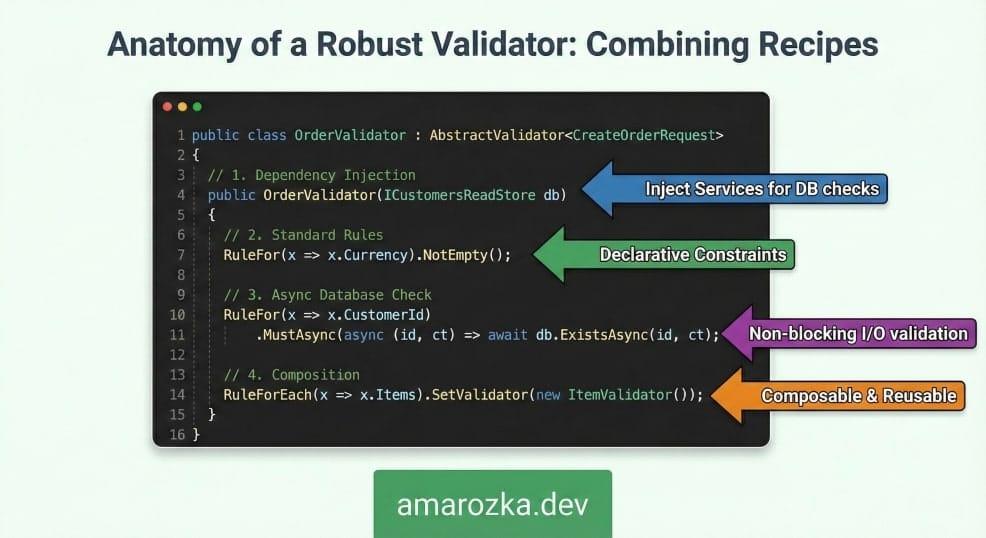
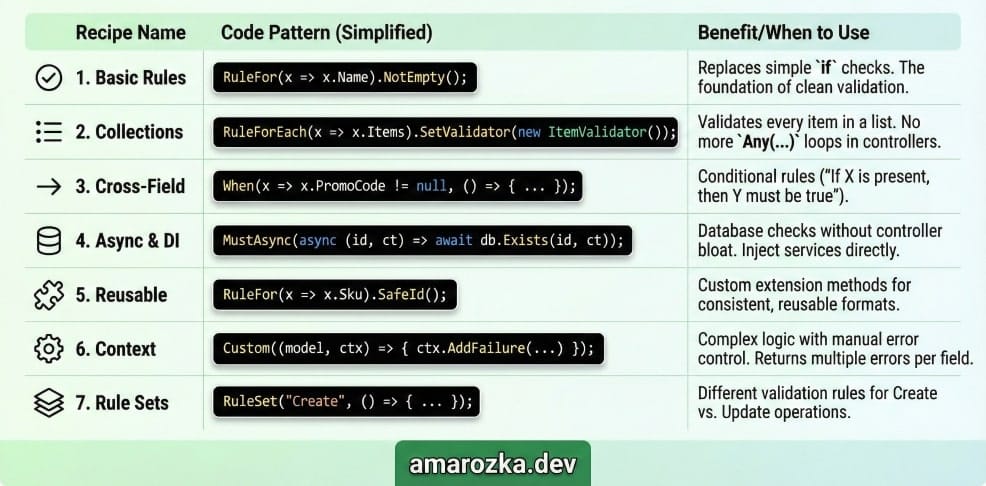
Recipe 1: Basic rules that replace controller ifs
Let’s start with a clean request model.
public sealed record CreateOrderRequest(
    string CustomerId,
    string Currency,
    List<CreateOrderItemRequest> Items,
    string? PromoCode);

public sealed record CreateOrderItemRequest(
    string Sku,
    int Quantity,
    decimal UnitPrice);
Validator:
using FluentValidation;

public sealed class CreateOrderRequestValidator : AbstractValidator<CreateOrderRequest>
{
    public CreateOrderRequestValidator()
    {
        RuleFor(x => x.CustomerId)
            .NotEmpty()
            .MaximumLength(64);

        RuleFor(x => x.Currency)
            .NotEmpty()
            .Must(c => c is "USD" or "EUR")
            .WithMessage("Currency must be USD or EUR");

        RuleFor(x => x.Items)
            .NotNull()
            .Must(items => items.Count > 0)
            .WithMessage("At least one item is required");
    }
}
Now the controller becomes the size it should be:
[HttpPost("orders")]
public async Task<IActionResult> Create(CreateOrderRequest request, CancellationToken ct)
{
    var result = await _orders.CreateAsync(request, ct);
    return Ok(result);
}
If you only do this recipe, you already removed noise and improved testability.
Recipe 2: Validate collections with child rules (no more Any(...) in controllers)
Collections are where controller code usually turns into spaghetti.
public sealed class CreateOrderItemRequestValidator : AbstractValidator<CreateOrderItemRequest>
{
    public CreateOrderItemRequestValidator()
    {
        RuleFor(x => x.Sku)
            .NotEmpty()
            .MaximumLength(32);

        RuleFor(x => x.Quantity)
            .GreaterThan(0);

        RuleFor(x => x.UnitPrice)
            .GreaterThanOrEqualTo(0m);
    }
}
Attach it to the main validator:
public sealed class CreateOrderRequestValidator : AbstractValidator<CreateOrderRequest>
{
    public CreateOrderRequestValidator()
    {
        // ...other rules

        RuleForEach(x => x.Items)
            .SetValidator(new CreateOrderItemRequestValidator());
    }
}
Tip from my projects: if you register validators via DI, prefer DI for the child validator too:
public sealed class CreateOrderRequestValidator : AbstractValidator<CreateOrderRequest>
{
    public CreateOrderRequestValidator(IValidator<CreateOrderItemRequest> itemValidator)
    {
        RuleForEach(x => x.Items)
            .SetValidator(itemValidator);
    }
}
That keeps construction consistent and lets you inject dependencies into child validators later.
Recipe 3: Cross-field rules (the “two fields must agree” classic)
Example: If PromoCode is set, currency must be USD (pretend marketing said so).
public sealed class CreateOrderRequestValidator : AbstractValidator<CreateOrderRequest>
{
    public CreateOrderRequestValidator(IValidator<CreateOrderItemRequest> itemValidator)
    {
        RuleFor(x => x.PromoCode)
            .MaximumLength(20);

        When(x => !string.IsNullOrWhiteSpace(x.PromoCode), () =>
        {
            RuleFor(x => x.Currency)
                .Equal("USD")
                .WithMessage("PromoCode can be used only with USD");
        });

        RuleForEach(x => x.Items).SetValidator(itemValidator);
    }
}
Another common one: “end date must be after start date”.
public sealed record ReportRequest(DateOnly From, DateOnly To);

public sealed class ReportRequestValidator : AbstractValidator<ReportRequest>
{
    public ReportRequestValidator()
    {
        RuleFor(x => x)
            .Must(x => x.To >= x.From)
            .WithMessage("To must be on or after From");
    }
}
This keeps the rule close to the contract (the DTO), not scattered across controllers.
Recipe 4: Async rules with DI (database checks without controller bloat)
This is where FluentValidation really earns its keep.
Example: CustomerId must exist.
public interface ICustomersReadStore
{
    Task<bool> ExistsAsync(string customerId, CancellationToken ct);
}
Validator with DI + async rule:
public sealed class CreateOrderRequestValidator : AbstractValidator<CreateOrderRequest>
{
    public CreateOrderRequestValidator(
        ICustomersReadStore customers,
        IValidator<CreateOrderItemRequest> itemValidator)
    {
        RuleFor(x => x.CustomerId)
            .NotEmpty()
            .MaximumLength(64)
            .MustAsync(async (customerId, ct) =>
                await customers.ExistsAsync(customerId, ct))
            .WithMessage("Customer does not exist");

        RuleForEach(x => x.Items).SetValidator(itemValidator);
    }
}
Two small but important notes from experience:
- Keep the read store fast. Validation is on the request path.
- Cancellation matters: always pass
ct.
If you ever had controllers doing DB queries just to validate input, this moves that logic to a proper place.
Recipe 5: Custom reusable rules (stop rewriting email/slug/password checks)
I like small, focused extension methods. They read well and you can standardize rules across the whole API.
Example: reusable “safe identifier” rule.
using System.Text.RegularExpressions;
using FluentValidation;

public static class ValidationExtensions
{
    private static readonly Regex SafeIdRegex = new("^[a-zA-Z0-9_-]+$", RegexOptions.Compiled);

    public static IRuleBuilderOptions<T, string> SafeId<T>(
        this IRuleBuilder<T, string> ruleBuilder,
        int maxLength = 64)
    {
        return ruleBuilder
            .NotEmpty()
            .MaximumLength(maxLength)
            .Must(id => SafeIdRegex.IsMatch(id))
            .WithMessage("Only letters, digits, '_' and '-' are allowed");
    }
}
Use it:
public sealed class CreateOrderItemRequestValidator : AbstractValidator<CreateOrderItemRequest>
{
    public CreateOrderItemRequestValidator()
    {
        RuleFor(x => x.Sku).SafeId(maxLength: 32);
        RuleFor(x => x.Quantity).GreaterThan(0);
        RuleFor(x => x.UnitPrice).GreaterThanOrEqualTo(0m);
    }
}
This is the pattern that pays off in large codebases: once the extension exists, you get consistent behavior everywhere.
Recipe 6: Custom validators with context (add one rule, return many errors)
Sometimes you need a rule that checks multiple things and can report different failures.
Example: shipping address rules that depend on country.
public sealed record AddressRequest(
    string Country,
    string City,
    string PostalCode,
    string Line1,
    string? Line2);
Custom rule using Custom(...):
public sealed class AddressRequestValidator : AbstractValidator<AddressRequest>
{
    public AddressRequestValidator()
    {
        RuleFor(x => x.Country).NotEmpty();
        RuleFor(x => x.City).NotEmpty();
        RuleFor(x => x.Line1).NotEmpty().MaximumLength(100);

        RuleFor(x => x).Custom((address, context) =>
        {
            if (address.Country == "US")
            {
                if (address.PostalCode.Length != 5 || !address.PostalCode.All(char.IsDigit))
                    context.AddFailure(nameof(address.PostalCode), "US PostalCode must be 5 digits");
            }
            else if (address.Country == "BG")
            {
                // Simple example, not real postal rules.
                if (address.PostalCode.Length < 4)
                    context.AddFailure(nameof(address.PostalCode), "BG PostalCode must be at least 4 chars");
            }
            else
            {
                if (string.IsNullOrWhiteSpace(address.PostalCode))
                    context.AddFailure(nameof(address.PostalCode), "PostalCode is required");
            }
        });
    }
}
Why I like Custom(...) for cases like this:
- You don’t fight the “one rule per property” shape.
- You can emit targeted errors per field.
Use it from a parent validator via SetValidator(...) like in recipe 2.
Recipe 7: Rule sets for “create vs update” without duplicating DTOs
In real APIs you often validate the same DTO differently depending on operation.
Example: on create you require Password; on update it’s optional.
public sealed record UserUpsertRequest(
    string Email,
    string? DisplayName,
    string? Password);

public sealed class UserUpsertRequestValidator : AbstractValidator<UserUpsertRequest>
{
    public const string Create = "Create";
    public const string Update = "Update";

    public UserUpsertRequestValidator()
    {
        RuleFor(x => x.Email)
            .NotEmpty()
            .EmailAddress();

        RuleFor(x => x.DisplayName)
            .MaximumLength(50);

        RuleSet(Create, () =>
        {
            RuleFor(x => x.Password)
                .NotEmpty()
                .MinimumLength(12)
                .WithMessage("Password must be at least 12 chars");
        });

        RuleSet(Update, () =>
        {
            RuleFor(x => x.Password)
                .MinimumLength(12)
                .When(x => !string.IsNullOrWhiteSpace(x.Password));
        });
    }
}
Then validate explicitly where needed (for example, in a service or endpoint filter):
public sealed class UsersService
{
    private readonly IValidator<UserUpsertRequest> _validator;

    public UsersService(IValidator<UserUpsertRequest> validator)
        => _validator = validator;

    public async Task CreateAsync(UserUpsertRequest request, CancellationToken ct)
    {
        var result = await _validator.ValidateAsync(request, options =>
            options.IncludeRuleSets(UserUpsertRequestValidator.Create), ct);

        if (!result.IsValid)
            throw new ValidationException(result.Errors);

        // ...create user
    }
}
This is also handy outside HTTP: background jobs, message consumers, CLI tools.
What “clean controller logic” looks like
Here’s the flow you want:
HTTP Request
   |
   v
Model binding -> FluentValidation -> 400 with errors (if invalid)
   |
   v
Controller action (tiny)
   |
   v
Use case / service / handler
Controllers should coordinate, not judge.
Practical tips I learned the hard way
- Don’t put business rules in DTO validators if the rule needs domain context that changes often (pricing, stock, permission). Put those in the use case/service layer.
- Do put input correctness rules in validators (formats, required fields, safe ranges, basic existence checks).
- Keep error messages stable if clients depend on them. If you can, return structured error codes (not just text).
- Validate in non-HTTP paths too. I often call validators in message handlers to keep the same rules.
A small rule of thumb I use: if the rule is about the shape and correctness of input, FluentValidation is the right place.
FAQ: FluentValidation patterns in real APIs
[ApiController] and model validation?Yes. Keep [ApiController] for binding and error responses. FluentValidation becomes the main validation engine.
Sometimes. Keep it limited to quick checks (existence, uniqueness). For heavy logic, prefer the use case/service layer.
DbContext into validators?You can, but I prefer injecting a small read store (ICustomersReadStore) to keep validators easy to test and reduce coupling.
Close to the DTOs (feature folders work well):
– Features/Orders/Create/CreateOrderRequest.cs
– Features/Orders/Create/CreateOrderRequestValidator.cs
ASP.NET Core already returns a ProblemDetails-ish model state response. If you need a custom format, use middleware or an action filter.
Conclusion: 7 ways to keep controllers boring and clean
When you move validation into FluentValidation, controllers stop being a giant wall of if statements and start doing their real job: route the request to the use case.
If you want a simple plan, do this next:
- Add FluentValidation auto-validation.
- Move basic checks (required, ranges, formats).
- Add collection validators and a couple of cross-field rules.
- Only then add DI + async checks for things like “exists”.
Try refactoring one endpoint today and compare the controller diff. You’ll feel it.
What’s the worst validation mess you’ve seen in a controller, and what rule caused it?