

Still adding AutoMapper to every new .NET service on autopilot? In 2025 that habit is quietly draining your startup time, hiding bugs, and making your mapping logic harder to reason about than it should be.
For years, AutoMapper has been the default answer to “how do I map DTOs in .NET?”. You install the package, add a couple of profiles, and boom – your controller magically returns a flattened response model. But this “magic” comes with a cost: reflection at startup, hidden mapping rules, and unpleasant surprises at runtime.
The good news: you no longer need that kind of magic.
Source-generated mappers like Mapperly and Mapster give you:
- Compile-time safety instead of runtime surprises
- Simple, readable mapping code
- Near hand-written performance and almost zero extra allocations
In this article I’ll walk you through why it’s time to stop defaulting to AutoMapper, what is wrong with the way many teams use it, and how to move to Mapperly or Mapster without breaking your entire codebase.
Why AutoMapper Was Great (And Why It Hurts Now)
Let’s be fair first. AutoMapper solved a real problem for .NET developers:
- It removed boring property copying boilerplate
- It made “simple” mappings one line of code:
mapper.Map<TDest>(src) - It came with a rich config API for flattening, custom resolvers, and type conversions
Back when servers were large VMs that restarted once in a blue moon and we didn’t care much about cold start, AutoMapper’s reflection-heavy design was a fine trade-off.
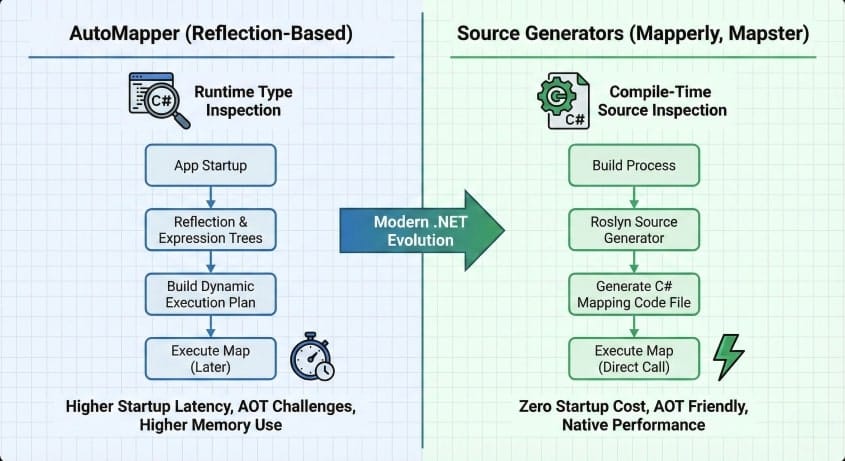
But the world changed:
- .NET 6/7/8 pushed us towards trimming, AOT, and microservices
- We deploy to containers where cold start and memory actually matter
- We want observability and debuggability more than clever magic
In that world, a runtime reflection mapper looks more like legacy than help.
AutoMapper Anti-Patterns You Probably Have In Your Codebase
The tool itself is not evil. The way we tend to use it is.
Here are a few patterns I keep seeing in audits and refactors.
1. God Profile With Hidden Business Logic
You have a single MappingProfile with hundreds of lines like this:
public class MappingProfile : Profile
{
    public MappingProfile()
    {
        CreateMap<Order, OrderDto>()
            .ForMember(d => d.CustomerFullName,
                o => o.MapFrom(s => s.Customer.FirstName + " " + s.Customer.LastName))
            .ForMember(d => d.Total,
                o => o.MapFrom(s => s.Lines.Sum(x => x.Quantity * x.Price)))
            .ForMember(d => d.Status,
                o => o.MapFrom(s => s.IsPaid ? "Paid" : "Pending"));

        // 200 more mappings...
    }
}
On paper this is only mapping logic. In practice, you now have:
- Business rules (how to build
Status, how to computeTotal) buried in AutoMapper config - Copy-pasted expressions hidden inside lambda expressions
- A “God profile” that no one wants to touch because it is fragile
2. Reflection-Heavy Startup
AutoMapper scans assemblies, builds internal graphs, and validates configuration. That work happens at startup and uses reflection all over the place.
For a large service with dozens of profiles and hundreds of maps, that can easily show up as a measurable chunk of startup time in your traces.
In cloud setups where you scale pods up and down often, this is not free.
3. Runtime Errors Instead of Compile-Time Feedback
AutoMapper’s freedom comes at a cost:
- You can typo member names in
ForMembercalls - You can forget to add a map for a type and get runtime errors under load
- You can break a map by renaming a property and only see it when a specific endpoint gets hit
IDE refactor tools cannot help you much because configuration sits inside fluent APIs and string-based config.
4. “I Have No Idea Where This Value Comes From”
Debugging a complex flattened DTO often looks like this:
- Put a breakpoint in controller
- Step into
mapper.Map<T> - Land inside AutoMapper internals
- Give up and write
Console.WriteLinesomewhere
This is the exact opposite of observable code. The mapping logic is real code, but you cannot easily see or debug it.
Compile-Time Over Runtime: The 2025 Way
Since C# 9, source generators have become a first-class feature. Instead of building huge expression trees at runtime, we can generate plain C# mapping code during build.
You get:
- No reflection at runtime for mapping
- Plain methods that you can step into with the debugger
- Full support for trimming and AOT
Mapperly and Mapster both ride this wave. They generate mapper methods as .g.cs files in your project. The result looks like code you would write by hand, only faster and with less typing.
What “Zero-Allocation Mapping” Means (And What It Doesn’t)
“Zero-allocation” here means: the mapper itself does not allocate extra temporary objects or collections while copying data.
Of course, if your destination type has reference type properties, you still create the destination object and nested objects as needed. That part is unavoidable.
The important bit is:
- No boxing
- No reflection caching structures
- No extra lists or dictionaries built on every mapping
In practice this puts source-generated mappers very close to manual mapping in benchmarks. For high-throughput APIs this is nice, but even for regular line-of-business apps it means less GC pressure and fewer surprises.
Mapperly: Source Generator First
Mapperly is built around source generation from day one. You define a mapper as a partial class and let the generator fill in the rest.
Basic Mapperly Example
Let’s start with a boring but realistic case: mapping a domain entity to a DTO.
using Riok.Mapperly.Abstractions;

public sealed class Order
{
    public Guid Id { get; set; }
    public Customer Customer { get; set; } = default!;
    public List<OrderLine> Lines { get; set; } = new();
    public bool IsPaid { get; set; }
}

public sealed class Customer
{
    public string FirstName { get; set; } = string.Empty;
    public string LastName  { get; set; } = string.Empty;
}

public sealed class OrderLine
{
    public int Quantity { get; set; }
    public decimal Price { get; set; }
}

public sealed class OrderDto
{
    public Guid Id { get; set; }
    public string CustomerFullName { get; set; } = string.Empty;
    public decimal Total { get; set; }
    public string Status { get; set; } = string.Empty;
}

[Mapper]
public partial class OrderMapper
{
    public partial OrderDto ToDto(Order order);
}
After you build, Mapperly generates an implementation something like this (simplified):
public partial class OrderMapper
{
    public partial OrderDto ToDto(Order order)
    {
        var target = new OrderDto();
        target.Id = order.Id;
        target.CustomerFullName = order.Customer.FirstName + " " + order.Customer.LastName;
        target.Total = order.Lines.Sum(x => x.Quantity * x.Price);
        target.Status = order.IsPaid ? "Paid" : "Pending";
        return target;
    }
}
No reflection. Just regular C# code. When you step into ToDto, you step into this body.
Custom Mappings With Attributes
In AutoMapper, you pile up ForMember calls. In Mapperly, you use attributes and helper methods.
[Mapper]
public partial class OrderMapper
{
    [MapProperty("Customer", "CustomerFullName")]
    private static string MapCustomerName(Customer customer)
        => string.Concat(customer.FirstName, " ", customer.LastName);

    [MapProperty("Lines", "Total")]
    private static decimal MapTotal(List<OrderLine> lines)
        => lines.Sum(x => x.Quantity * x.Price);

    [MapProperty("IsPaid", "Status")]
    private static string MapStatus(bool isPaid)
        => isPaid ? "Paid" : "Pending";

    public partial OrderDto ToDto(Order order);
}
Now your mapping rules are just static methods. You can unit test them directly, reuse them, and refactor them with full IDE help.
How It Feels in Real Projects
In my projects the real win is not just performance. It is:
- Greppable logic – search for
MapStatusand you see exactly where and how status is built - Normal debugging – set a breakpoint inside
MapTotaland inspect state like in any other method - Compiler as guard – if you rename a property or method, the generator fails the build instead of surprising you at runtime
Mapster: From Magic to Generated Code
Mapster started life closer to AutoMapper – runtime mapping with expression trees. But the library also ships tools that generate mapping code ahead of time.
You can use Mapster in three main styles:
- Pure runtime mapping (similar trade-offs to AutoMapper)
- Runtime config that generates and compiles expression trees
- Source-generated mapping using
Mapster.Tooland/or source generator support
We focus on the third one.
Basic Mapster Setup With Source Generation
Add the core package and the tool in your project:
dotnet add package Mapster
dotnet add package Mapster.Tool
Then define your DTOs and models like usual:
public sealed class CreateUserRequest
{
    public string Email { get; set; } = string.Empty;
    public string FirstName { get; set; } = string.Empty;
    public string LastName { get; set; } = string.Empty;
}

public sealed class User
{
    public Guid Id { get; set; }
    public string Email { get; set; } = string.Empty;
    public string FullName { get; set; } = string.Empty;
}
You can write a mapping configuration:
public class MapsterConfig : IRegister
{
    public void Register(TypeAdapterConfig config)
    {
        config.NewConfig<CreateUserRequest, User>()
            .Map(dest => dest.FullName,
                src => src.FirstName + " " + src.LastName);
    }
}
Then use the tool to generate code based on this config:
dotnet mapster model --allThis produces .g.cs mapper files containing methods equivalent to hand-written mapping. In your code you call:
var user = request.Adapt<User>();but at runtime this is just a call into generated code, not reflection or dynamic expression compilation.
Why You Might Prefer Mapster Over Mapperly
- You already use Mapster in runtime mode and want a gradual move to generation
- You like its flexible config API
- You need some of its advanced features (like projection, collections support, etc.) and are comfortable with its model
Mapperly feels more “C# attribute”-driven; Mapster feels more “fluent configuration that can be turned into code”. Both give you generated methods in the end.
Migrating From AutoMapper to Mapperly
Let’s talk about the scary part: how to move an existing project away from AutoMapper without breaking everything.
Here is a practical step-by-step plan that worked well for me.
Step 1: Freeze New AutoMapper Usage
First rule: stop adding new mappings to AutoMapper.
Create a team guideline such as:
All new mappings should use Mapperly (or Mapster). AutoMapper is legacy and only touched for fixes.
This avoids digging the hole deeper while you migrate.
Step 2: Identify Logical Groups of Maps
Go through your profiles and group maps by feature area:
- Orders
- Users
- Billing
- etc.
For each area, list the main mapping pairs: Order -> OrderDto, Order -> OrderSummaryDto, CreateOrderRequest -> Order, and so on.
Step 3: Create Mapperly Classes Per Feature
For the Orders example, create a mapper like this:
[Mapper]
public partial class OrdersMapper
{
    public partial OrderDto ToDto(Order order);
    public partial OrderSummaryDto ToSummaryDto(Order order);
    public partial Order FromCreateRequest(CreateOrderRequest request);
}
Let the generator create initial mappings for you. Then manually adjust where you previously had ForMember rules.
Keep the mapper small and cohesive. When a feature area grows too large, split it into multiple mapper classes.
Step 4: Wire Mapperly Through Dependency Injection
You can register the mapper as a singleton or scoped service:
services.AddSingleton<OrdersMapper>();Use it in controllers and handlers:
public sealed class OrdersController : ControllerBase
{
    private readonly OrdersMapper _mapper;

    public OrdersController(OrdersMapper mapper)
    {
        _mapper = mapper;
    }

    [HttpGet("{id}")]
    public async Task<ActionResult<OrderDto>> Get(Guid id)
    {
        var order = await _ordersRepository.GetById(id);
        if (order is null) return NotFound();
        return _mapper.ToDto(order);
    }
}
Now the mapping is explicit and testable.
Step 5: Replace AutoMapper Usage Gradually
Pick one feature area, swap AutoMapper usage with Mapperly calls, and run tests.
Example change in a handler:
// Before
var dto = _mapper.Map<OrderDto>(order);

// After
var dto = _ordersMapper.ToDto(order);
Do this area by area. When an area has no more AutoMapper usage, delete its maps from the AutoMapper profile.
Step 6: Remove AutoMapper Completely
Once you no longer call IMapper anywhere, you can:
- Remove the AutoMapper packages
- Delete the remaining profiles
- Drop related setup in DI
At this point your mapping layer becomes:
- A set of small mapper classes
- Generated code that you can open and read
- Unit tests that cover your mapping logic directly
Migrating From AutoMapper to Mapster (Generated)
If you prefer Mapster, the migration story is similar but with slightly different steps.
Step 1: Introduce Mapster and Mapster.Tool
Add packages and register TypeAdapterConfig in DI. Configure Mapster to use generation for the maps you care about most (hot paths, common DTOs).
Step 2: Mirror AutoMapper Profiles as Mapster Config
For each AutoMapper profile, create a class implementing IRegister and build maps using the fluent API:
public sealed class OrdersMapsterConfig : IRegister
{
    public void Register(TypeAdapterConfig config)
    {
        config.NewConfig<Order, OrderDto>()
            .Map(d => d.CustomerFullName,
                s => s.Customer.FirstName + " " + s.Customer.LastName)
            .Map(d => d.Total,
                s => s.Lines.Sum(x => x.Quantity * x.Price));
    }
}
Then run Mapster.Tool to generate code.
Step 3: Replace AutoMapper Calls With Mapster Extensions
Change code like:
// Before
var dto = _mapper.Map<OrderDto>(order);

// After
var dto = order.Adapt<OrderDto>();
Under the hood this uses generated code, not runtime expression compilation.
Step 4: Remove AutoMapper When Safe
Same as with Mapperly: once all call sites are migrated, remove the AutoMapper dependency.
Debugging and Observability: Night and Day Difference
Source-generated mappers completely change how you debug mapping issues.
With AutoMapper you often ask:
- Which profile configured this map?
- Why is this property null?
- Why did this nested object not get mapped?
You search across profiles and scan through long chains of ForMember calls.
With Mapperly or generated Mapster you instead:
- Step into the generated method
- See normal assignments and helper method calls
- Fix the code like any other part of the system
Your observability tools also become more useful: stack traces, logs, and traces show real methods, not AutoMapper internals.
Performance: What You Gain By Dropping Reflection
Benchmarks vary by scenario, but in general you can expect:
- Lower startup time (no reflection scanning and configuration build)
- Shorter allocation paths during mapping
- Throughput similar to hand-written mapping code
If you care about:
- High QPS APIs
- Background workers that map huge batches of data
- .NET 8 AOT
then runtime reflection-based mappers become a bottleneck and a risk. Source-generated mapping aligns much better with how the modern .NET runtime wants to work.
When AutoMapper Is Still Fine
Let’s be honest: for a small internal admin app that maps a handful of DTOs, AutoMapper will not bring your system down.
You might choose to:
- Keep AutoMapper in old modules that you rarely touch
- Use Mapperly/Mapster only in new services and high-load paths
That is a valid path. The key is not to introduce AutoMapper in new code just because “we always used it”.
How to Choose Between Mapperly and Mapster
A quick comparison from a practical angle:
Mapperly
- Pure source generator mindset
- Mapping logic as attributes and methods
- Very easy to read generated code
- Great if you like having mapping close to your domain classes in a clear, static way
Mapster (generated)
- Fluent configuration API
- Multiple modes (runtime, compiled, generated)
- Good when you migrate from existing Mapster usage
- Flexible configuration if you like fluent mapping DSLs
My rule of thumb:
- New greenfield service? I reach for Mapperly first.
- Existing codebase already using Mapster? Move it to generation mode before thinking about any other library.
Either way, the goal is the same: no more reflection-based magic on hot paths.
FAQ: Source-Generated Mapping in .NET
No. It still works and is actively used in many systems. The point is not that it stopped working, but that its design is not aligned with modern .NET priorities like trimming, AOT, and aggressive startup targets.
Yes. Both can handle nested graphs and collections. The generated code will create and fill collections just like your hand-written mapping would.
AutoMapper has strong support for projection. Mapperly is more focused on in-memory mapping. Mapster has projection capabilities too. In many codebases I now prefer explicit projections using LINQ instead of hiding them inside mapping libraries. It is clearer, and the query side is easier to review.
You have options:
– Use source generators that emit .g.cs files in obj/bin only
– Or use tools that generate .g.cs into your project and check them in
Both patterns work. I tend to keep generated files out of git unless I have a good reason to include them.
If you have a large existing AutoMapper setup and very limited time, ripping it out might not be worth it. But even then, consider moving new modules to Mapperly or Mapster as you touch them. Over time, the old AutoMapper churn shrinks.
At first you might miss mapper.Map<T> everywhere. After a week you will enjoy:
– Being able to follow mapping logic like any other code
– Clear compiler errors instead of runtime surprises
– Less magic and fewer surprises when debugging production incidents
Most teams I’ve seen migrate do not want to go back.
Conclusion: Compile-Time Mapping As Your New Default
The mapping layer is not a side toy. It is a core part of your API surface and domain flow. Hiding it behind runtime magic tools made sense years ago. Today it mostly adds risk and hides logic.
Mapperly and Mapster show a better way:
- Mapping becomes clear, testable C# code
- Source generators give you near manual performance with no extra work
- Problems show up at build time instead of during production incidents
So next time you spin up a new .NET service, ask yourself a simple question:
Do I really want to pay the long-term cost of reflection-based mapping, or do I want clear generated code that I can step through and trust?
My suggestion: treat AutoMapper as legacy and make source-generated mapping your default. Try Mapperly or Mapster in one service, measure startup and throughput, and see how it feels in your day-to-day debugging.
Then come back and tell me: once you moved one service off AutoMapper, did you feel like going back?